Thoughts

Stop Starting Over: A Better Way to Build Association Websites

Author

Joe Kepley

Industry:

Categories:

A graphic of a chain of paper cut-out people in front of a stylized web interface.

Learn how data orchestration helps associations avoid costly website rebuilds by decoupling content sources from the CMS — so switching tools doesn't mean starting over.

Communities are complex. They are made of people, and people cannot be broken into yes/no statements. They cannot be forced into singular categories, and they cannot help changing, constantly, at all times.

It’s these reasons — and dozens more we don’t have time to talk about! — that makes the work of association management so difficult, especially when building digital tools and communication models. Associations don’t create sites to simply publish a blog post and link to a value proposition — they provide value through content, collaboration, and — yes — community.

Headless and orchestration can help. Here’s how.

What Makes Association Websites Complex

This complexity shows up in three key areas:

  • Content access and membership value — If all the content is free, what makes membership worth paying for? Associations need rules around who can see what content, balancing free content (to attract members) with members-only content (to keep them).
  • Identity and membership tiers — Beyond simple member/non-member distinctions, associations often have multiple membership levels with different access rights. This information typically lives in an Association Management System (AMS) or Customer Relationship Management System (CRM), which needs to connect to content delivery systems.
  • Member-generated content and data — Members aren't just consuming content, but creating it as well. This means pulling together data from discussion forums, learning management, event registrations, research databases, and other sources into one cohesive experience. This content isn’t just limited to the CMS, and it isn’t even limited to “content” in the traditional sense.

The "New Website" Trap

All of those moving parts lead to a lot of complexity for an association’s digital presence, and combining them into a smooth, consistent experience can become a big, complex project. 

Because the web experience is the most visible victim of all of this complexity, and the thing that both the association and its members are unhappy with, most projects start with a loaded request: “We need a new website.” This leads to approaching the project as the “new website” project, which means you start talking to web firms. These firms focus on the web experience (great), implement a new design (cool!), and build it on a brand new shiny content management system (neat!). Then they integrate all of those other tools and data sources through the CMS, usually at great expense and complexity. You end up with daily scheduled jobs pulling data from other systems in order to turn them into web pages. 

And there’s nothing wrong with that… to start with. But now you’ve got your whole enterprise content stack jammed into a content management system with a bunch of bespoke code. 

This brings us into conflict with another fact of associations: they’re constantly changing. Budgets shift, markets evolve, and member demands require new tools. Whenever I talk with association IT folks about their software, there’s always at least one instance (and usually more) of someone saying, “We’re using X, but we’re in the process of switching to Y”. X and Y might be the AMS, the LMS, the search system, the payment processor — take your pick! But now all of that integration code becomes a liability. Switching any one of these systems means new content models, new templates, new import scripts — basically starting from zero with the integration work for that system.

A Better Approach: Orchestration First

To get around this headache, we need to take a step back; our “new website” shouldn’t be the center of the universe. To deliver a great and consistent digital experience to our members, we need a great and consistent representation of our data — one that’s not tied to a specific platform, but instead represents how our association thinks and organizes information. We can then use that representation to power all of our digital platforms. 

This is where data orchestration platforms come in. These tools sit between your data sources and your digital platforms, providing a consistent representation of your data and content that can handle production-level traffic and making it easier to switch to different back-end systems. Tools like Enterspeed, Umbraco Compose, or Optimizely Content Graph consume data from all of these sources and represent it as one big API that you control — not your technology vendors. 

How It Works: An Event Management Example

Let’s look at an example of how this works with something like event management. Suppose we’re currently managing our events with Eventbrite, and want to provide a custom experience on our website to list them. 

The CMS-First Approach

Under a CMS-first approach, a developer looks at what we need to show for an event and creates a content model in the CMS. This might include: 

  • Event title
  • Speaker name
  • Venue name
  • Date
  • Time
  • Registration link
  • Description
  • Tags

The developer then builds an event page template in the CMS to match the design, and creates a daily scheduled task that pulls from Eventbrite’s API, lists all events, and creates a corresponding event page in the CMS for each one.

Everything works, but the whole process — from import to display — is built around Eventbrite. We’ve created a tightly coupled system.
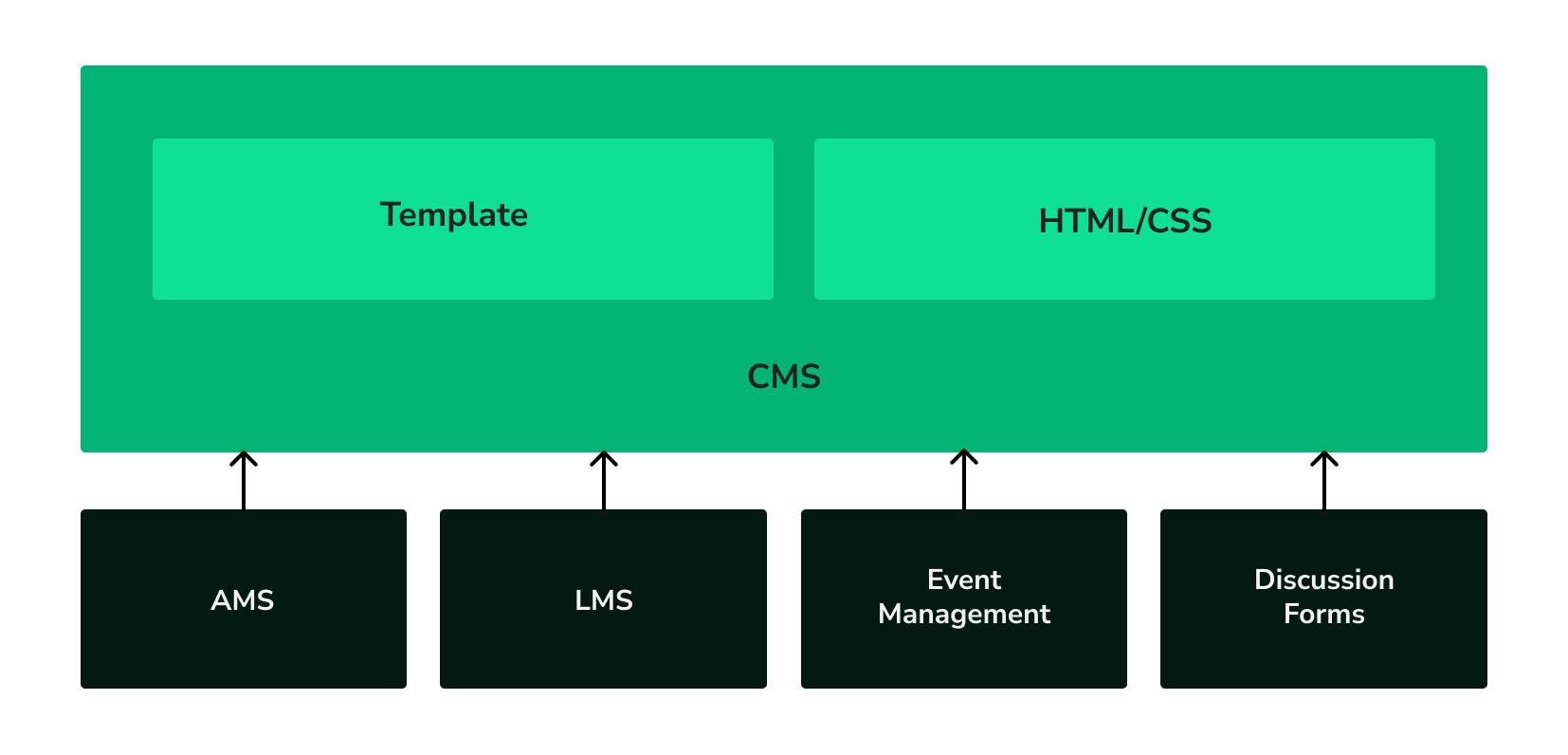
A graphic of boxes & arrows showing how the CMS pulls the AMS, LMS, Event Management, and Discussion Forums into the CMS itself, alongside templates and HTML/CSS.

The Orchestration Approach

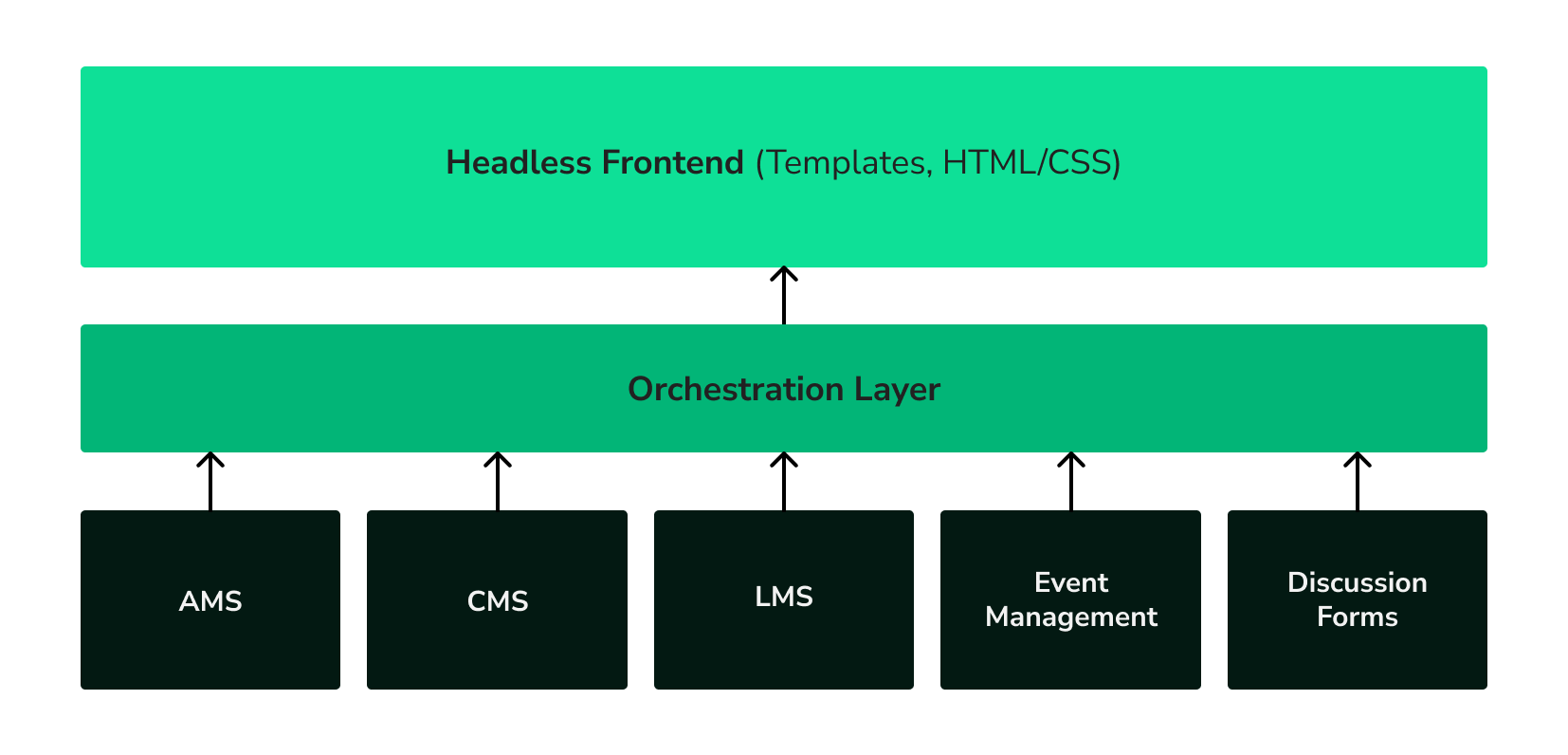
With a data orchestration platform, event data never goes into the CMS at all! Instead, the orchestration platform sits in the middle: Eventbrite feeds data in, and the website pulls data out.

Rather than accepting Eventbrite’s data model as-is, we define our own event data model and convert what Eventbrite gives us into that format. We’d still need a script to pull data from Eventbrite, and we’d still need to build templates in the CMS to display that data. So it seems like we havent really saved any time, right?

A graphic of boxes & arrows showing how an orchestration layer pulls AMS, CMS, LMS, Event Management, and Discussion Forums together to show on a Headless Frontend.

The Payoff: Switching Systems

Now, suppose we’ve decided to switch from Eventbrite to Whova.

In the CMS-first scenario, we’re starting over. The import script, the pages, the templates — everything is built around Eventbrite’s structure. Every layer of the application needs rework to accommodate the switch.

With the orchestration platform, only the import script knows about Eventbrite or Whova. Nothing else in the system needs to change! We could even run systems at once if we wanted. A little extra thought and complexity on the initial setup has now saved us significant time and made everything more portable.

Why This Matters

What we’ve done here is recognize a key principle: just because we have a CMS doesn’t mean that all of our web content should be CMS-managed content. Our events are only ever edited in the event system. We want them exposed and available to work with our other content, but the event management system remains the primary source of truth for event data.

Additional Benefits

Beyond just this conceptual architecture cleanup, this headless-over-orchestration approach provides several other advantages:

  • A unified enterprise API — Because all of our data flows into the orchestration system, we’ve created a de facto enterprise API that lets us query data from disparate systems in a unified way using GraphQL. This powers not only the website, but also mobile apps, internal systems, and anything else that needs to access our data in a platform-neutral manner. 
  • Real-time updates — We’ve traded the deep embedding of the data into the presentation for a set of ingest scripts for each data source. This allows much of our data to be pushed on update rather than pulled by scheduled tasks, so updates in source systems become available online immediately.
  • More accessible skillsets — By taking a headless approach, we’ve shifted much of the integration work from backend server languages like Java, PHP, and .Net to front-end skillsets: HTML, CSS, and Javascript. These skillsets are far more prevalent in the job market and better understood by AI coding assistants, making hiring new developers simpler.
  • Better performance — Modern headless frameworks like Next.js, Sveltekit, and Vue provide both an excellent developer experience and tend to produce more performant code. It’s not uncommon for well-implemented headless frameworks to achieve Lighthouse performance scores in the high 90s.

Managing an association’s enterprise stack is never simple, but by building an architecture that keeps the pieces decoupled and treats change as a constant, it can be done efficiently for the long term. Interested in hearing more? Contact us and let’s talk about what makes sense for your organization.

Tips for Associations.

We've written at length, both here and beyond, on Association websites. 

Joe Kepley |  August 28, 2024

Main Site or Microsite — Make the Most of Your Digital Event Strategy

Hosting an event for your association is one thing, but promoting it online to the right audience is a different conversation. 

Associations  |  Design and Front-End  | Development  | Strategy

Joe Kepley |  September 25, 2023

Improving Your Professional Association Site: Tips for Driving Engagement

Blend's CTO Joe Kepley has tips for how to increase website traffic and engagement for professional associations.  

Associations  |  Strategy

Taylor Lopour |  September 15, 2023

Getting Started with Web Experimentation 

Much like the early days of social media, digital experimentation is a rapidly expanding practice that promises to make big waves in the marketing world.

Digital Optimization  | Strategy

Joe Kepley |  January 6, 2022

Making the Choice Between Umbraco and Wordpress

An overview of the differences between two open-source CMS systems: Umbraco and Wordpress.

Development  | Umbraco

Corey Vilhauer |  September 23, 2020

Understanding Site Search — Your Guide to Site Search Functionality

Site search requires big decisions — and solid expectations. We introduce a four-part series on planning for and making decisions around your site's internal search.

Content and IA  | Development  | Strategy

Related work.

We’ve done a lot of great things for a lot of great clients — including a lot of association and membership group clients. Check out more projects similar to this one.